Washer Communication Error
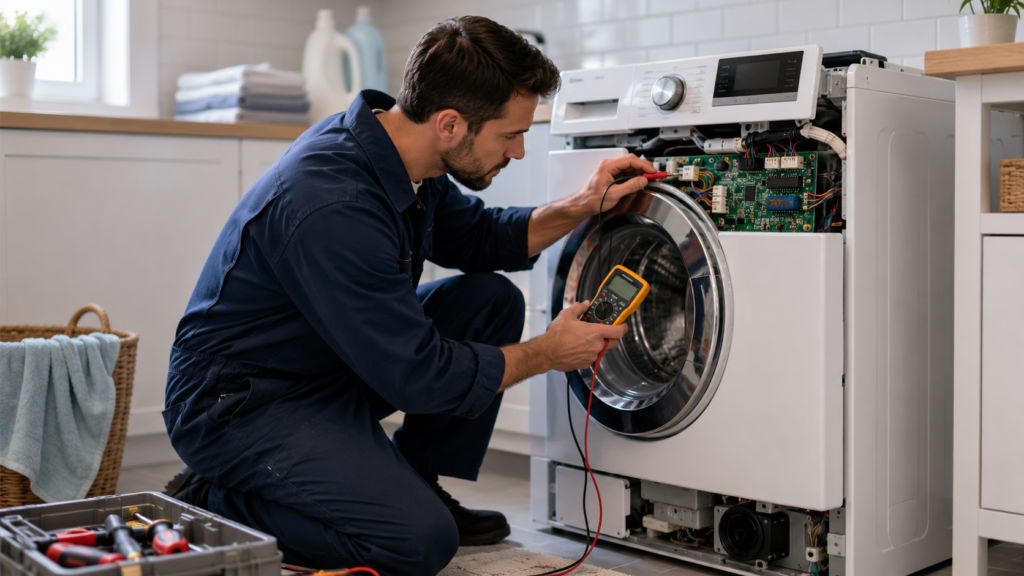
A washer communication error is one of the most unsettling faults a washing machine can throw at you. One moment the cycle is running normally, and the next the machine freezes, beeps repeatedly, or flashes a code you’ve never seen before. Unlike a simple drain or fill issue, this kind of fault points to something happening inside the machine’s electronics rather than a clogged hose or an unbalanced load. The good news is that the story behind nearly every washer communication error is more predictable. and more fixable. than it first appears
Quick Key Takeaways
- A washer communication error usually means two electronic control boards have stopped communicating properly.
- Loose wiring connections are more common than a failed control board.
- A complete power reset often clears temporary communication faults.
- Inspect wiring harnesses and connectors before replacing expensive parts.
- If the error returns repeatedly, professional diagnosis may be necessary.
What a Washer Communication Error Really Means
Modern washing machines aren’t run by a single mechanical timer anymore. Front-load and high-efficiency models in particular rely on a small network of electronic boards that work together: a main control board that oversees the wash cycle, a user interface board that manages the display and buttons, and often a separate motor control or inverter board that handles drum speed and spin behavior.
These boards pass signals back and forth constantly, dozens of times per second, in a process technicians call “handshaking.” A washer communication error shows up when one board sends a signal and either gets no response back or gets a response that doesn’t match what it expected. When that handshake breaks down, the washer’s firmware is designed to halt the cycle rather than keep guessing. because a board that can’t communicate reliably might also fail to stop the motor or unlock the door safely.
That’s why a washer communication error is treated as a safety fault rather than a random glitch. The machine is protecting you and itself from a bigger mechanical problem that could be hiding behind the broken connection.
Common Codes That Signal a Washer Communication Error

Every manufacturer labels a washer communication error a little differently, which is part of why it’s so confusing the first time you see it. A few examples worth knowing:
- Whirlpool / older Duet models: F-11, indicating a communication breakdown between the central control unit and the motor control unit
- Newer Whirlpool front loaders: F-28, the modern label for the same fault
- Maytag: F6 E2, typically a communication failure between the control board and the user interface board
- Samsung / LG: AE or AE6, meaning the main board has lost contact with the inverter or sub-board
- Speed Queen: Er CO, a signal failure within the drive electronics
The labels differ, but the underlying story is almost always the same .two boards that are supposed to be talking to each other have stopped doing so reliably
What Actually Causes a Washer Communication Error
Here’s the part that surprises a lot of homeowners: a washer communication error is almost never caused by a genuinely dead circuit board. In the overwhelming majority of cases, both boards involved are perfectly functional. The real problem sits at the connection between them. a wiring harness, a ribbon cable, or a connector that has loosened, corroded, or picked up just enough interference to disrupt the signal.
Washers vibrate heavily during every spin cycle, and that vibration adds up over months and years. A connector that was snug when the machine was new can gradually work itself loose. Add in heat, humidity, and the occasional splash from a leaking hose, and you have ideal conditions for a slow-developing fault rather than a sudden one. which is exactly why a washer communication error so often behaves erratically, working fine for several loads before reappearing out of nowhere.
Loose or corroded wiring connections are the single most frequent cause. The ribbon cable between the user interface board and the main control board is a common offender, since it’s thin, flexes every time the console or door is used, and takes regular bumps during normal operation.
Power surges and voltage fluctuations can momentarily scramble the timing between boards. A nearby lightning strike, a brownout, or even a shared circuit with a high-draw appliance can trigger a washer communication error that clears itself completely after a full power reset.
Moisture intrusion from a leaking door seal or a humid laundry room can corrode connector pins and pads. Even a small amount of corrosion introduces electrical noise that disrupts the handshake between boards, often producing a washer communication error that seems to come and go with the weather.
A genuinely failing board is possible but comparatively rare. When this is the true cause, the fault tends to be constant rather than intermittent, and it’s usually paired with other symptoms a completely unresponsive display, or several unrelated error codes appearing together
Quick Troubleshooting Guide
| Problem | First Thing to Check |
|---|---|
| Communication error appears once | Perform a full power reset. |
| Error comes back randomly | Inspect wiring harnesses and connectors. |
| Display freezes | Check the user interface board connection. |
| Several error codes appear | Have the control boards professionally tested. |
How to Diagnose a Washer Communication Error at Home

Before assuming the worst, work through these steps in order, starting with the cheapest and easiest.
- Do a full power reset. Unplug the washer, or flip the breaker if it’s hardwired, and leave it disconnected for a full 5 to 10 minutes so the control board’s capacitors fully discharge. This single step resolves a large share of washer communication error cases, since many are caused by nothing more than temporary software confusion.
- Check the power supply. Confirm the outlet delivers stable power, skip the extension cord, and try a different circuit if one’s available. A multimeter reading close to your region’s standard voltage rules out a supply-side cause before you look any further.
- Inspect the wiring harnesses. With the washer unplugged, remove the console or rear panel and look at the connectors running between the main board, the user interface, and the motor control board. Check for pins that look bent, connectors that aren’t fully seated, and insulation that’s melted or frayed. Reseat every connector firmlyeven ones that look fine, since a connection can appear seated while still making poor contact
Safety Note
Always disconnect the washer from the electrical outlet before removing panels or touching internal wiring. Even when the machine is turned off, some electronic components can temporarily store electrical energy after power has been disconnected.
- Look for moisture or corrosion. Water stains, rust, or a chalky residue around connector pins are a strong sign that a past leak is behind the current washer communication error.
- Rule out the boards themselves. If wiring and power both check out clean, the fault likely sits with one of the boards. Technicians typically diagnose this by swapping in a known-good board and seeing whether the error clears
When to Call a Technician
- The communication error returns immediately after every reset.
- You notice burn marks or damaged control board components.
- The washer repeatedly trips the circuit breaker.
- Multiple unrelated error codes appear during the same cycle.
- Wiring looks intact but communication faults continue.
When a Washer Communication Error Means You Need a Professional
Basic troubleshooting. resetting the machine, checking the outlet, inspecting visible wiring. is well within reach for most homeowners. Board replacement is a different story. Boards are usually not returnable once installed, they’re often the single most expensive part in the washer, and an incorrect diagnosis can mean paying for the wrong part twice.
Call in a professional if you notice any of the following:
- Burn marks or a burnt smell near the control board
- The washer trips the breaker whenever it powers on
- The error returns immediately after every reset
- Multiple unrelated error codes appear together
Preventing a Washer Communication Error From Coming Back
A few habits go a long way toward keeping this fault from returning. Avoid overloading the washer, since excessive vibration from an unbalanced spin is one of the biggest reasons connectors work loose over time. Repair leaks as soon as you notice them rather than letting moisture linger near the control panel, and if your home experiences frequent power flickers or storms, a surge protector rated for major appliances is a smart investment. It’s also worth periodically checking that the washer sits level on the floor, since reduced vibration means less long-term wear on the internal wiring.
If a washer communication error resurfaces after a repair, don’t write it off as bad luck. A fault that clears once and comes back within a few weeks usually points to a connection that wasn’t fully reseated, or a board that’s degrading rather than one that’s already failed. and catching that early is almost always cheaper than waiting for a full breakdown mid-cycle
Prevention Tips
- Keep the washer level to reduce vibration.
- Repair water leaks before moisture reaches electrical components.
- Avoid overloading the drum during every wash cycle.
- Use a quality surge protector where power fluctuations are common.
- Inspect visible wiring whenever the washer is serviced.
Final Thoughts on Washer Communication Errors
A washer communication error looks alarming on the display, but in most cases it’s telling you about a broken connection, not a broken machine. Start with a full power reset, check the power supply, and carefully inspect the wiring before assuming a control board needs replacing. Working through these steps in order resolves the majority of communication faults without spending a dollar on parts .and for the cases that don’t resolve on their own, you’ll walk into a service call already knowing exactly what’s been ruled out.
Estimate Your Washer Repair Cost
Not sure whether it’s worth repairing your washer? Use our free Washing Machine Repair Cost Calculator to estimate repair costs based on the faulty part and compare them with replacement costs before spending money on repairs.
Open Repair Cost Calculator →


1 comment
[…] Washer Communication Error – Causes, Symptoms & Troubleshooting […]