How to Reset Dryer Timer: 5 Easy Steps to Fix Common Problems
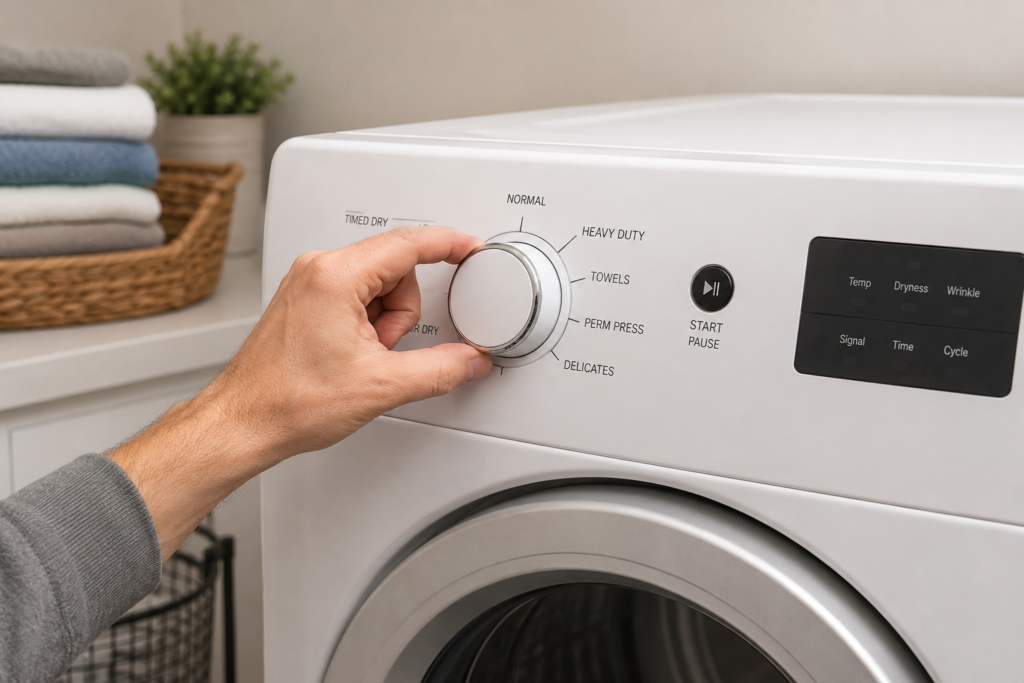
If your dryer suddenly stalls mid-cycle, won’t move past a certain point, or just isn’t responding the way it used to, learning how to reset dryer timer settings is often the fastest and cheapest fix to try before calling in a repair technician. The timer is the part of your machine responsible for tracking how long it runs, switching between heating and cooling, and telling the dryer when a cycle is complete. When it glitches or loses sync with the rest of the control system, your laundry routine can grind to a halt without warning.
This guide walks through exactly how to reset dryer timer functions on both mechanical dial models and newer electronic control boards. You’ll also learn what typically causes a timer to act up in the first place, and how to tell whether a reset actually solved the problem or whether something more serious is going on underneath. Learning how to reset dryer timer correctly can save time, reduce repair costs, and help restore normal dryer operation without replacing unnecessary parts.
Quick Key Takeaways
- Most dryer timer problems can be solved with a complete power reset.
- Mechanical and electronic timers require slightly different reset procedures.
- Always disconnect power before inspecting or resetting your dryer.
- If the timer still won’t advance after resetting, another component may be causing the issue.
- Routine maintenance helps prevent future timer problems.
Table of Contents
What Does a Dryer Timer Actually Control?
Before attempting a reset, it helps to know what this small component is actually doing behind the scenes. The timer manages:
- How long the drying cycle runs
- When the heating element switches on and off
- The cool-down phase near the end of a load
- The signal that tells you the cycle is finished
- Coordination with moisture sensors on automatic or sensor-dry settings
Older dryers rely on a mechanical dial connected to a small internal motor, while most newer models handle the same job through a digital control board. The technology differs, but the goal is identical: keep the drying process moving in the right order, at the right time.
Signs You Might Need to Reset Your Dryer Timer
Not every dryer issue calls for a reset, but a few common symptoms make it worth trying first. If you’re noticing any of the following, a reset dryer timer attempt is a reasonable place to start before assuming a part has failed:
- The dial or digital display seems frozen on one setting
- The dryer keeps running well past the time you selected
- It won’t advance through the normal drying stages
- The cycle ends too early and clothes come out still damp
- The control panel has stopped responding to button presses
- The dryer won’t start at all after you select a cycle
These symptoms often point to a temporary electronic hiccup rather than a permanently damaged timer, which is exactly why it’s worth ruling out with a simple reset first
Safety Note
Before attempting any dryer reset, disconnect the appliance from its power source. Never remove panels or touch internal electrical components while the dryer is connected to electricity. If you notice burning odors, damaged wiring, or visible scorch marks, stop troubleshooting immediately and have the appliance inspected before using it again.

Step 1: Cut the Power Completely
Regardless of what type of dryer you own, almost every reset process begins the same way: disconnect the power source entirely.
- Unplug the dryer from the wall outlet, or switch off the breaker if the unit is hardwired.
- Leave it disconnected for at least 5 to 10 minutes so any residual electrical charge can fully drain from the control board.
- Restore power by plugging it back in or flipping the breaker on again.
This basic power cycle resolves more minor glitches than you’d expect. It’s a lot like restarting a frozen computer. plenty of small errors clear themselves once the system fully shuts down and comes back up clean. This is the most important step in how to reset dryer timer because it clears temporary electrical glitches.
Step 2: Resetting a Mechanical Dial Timer
If your dryer uses an old-fashioned rotary dial instead of a digital display, resetting it is a straightforward, hands-on process. With the unit unplugged, locate the dial on the control panel and rotate it clockwise past the “off” marker until it clicks back to the very start of a cycle. Plug the dryer back in, select a normal drying cycle, and press start to confirm the dial advances the way it should.
If the knob spins loosely without any resistance, or refuses to move forward once the dryer is actually running, that’s usually a sign the internal timer motor has worn out. not something a simple reset will fix. After completing this part of how to reset dryer timer, verify that the timer dial advances normally during the cycle.
Step 3: Resetting an Electronic or Digital Timer
Dryers with touchpad controls and digital displays follow a slightly different sequence:
- Unplug the unit for a full 60 seconds to let the board discharge completely.
- While it’s still unplugged, press and hold the Start button for about 5 seconds. On many models, this releases any leftover power stored in the capacitors.
- Restore power to the dryer.
- Press Start again, or follow the exact button combination listed in your owner’s manual. some brands require holding Start along with a cycle selector button for several seconds.
- Choose a test cycle and watch the display to confirm the timer counts down normally.
Reset sequences do vary quite a bit between manufacturers, so if the general steps above don’t do the trick, it’s worth checking your model’s manual for the specific combination. If how to reset dryer timer does not restore normal operation, continue with the remaining troubleshooting steps below.
Common Mistakes to Avoid
- Resetting the dryer without disconnecting power first.
- Assuming the timer is faulty before checking the door switch or thermal fuse.
- Ignoring poor airflow caused by a clogged lint filter or vent.
- Repeatedly resetting the dryer instead of diagnosing the real problem.
- Using excessive force when turning a mechanical timer dial.
You May Also Like
If your dryer timer isn’t working correctly, these detailed troubleshooting guides can help you diagnose the exact problem and get your dryer running properly again.
Don’t Overlook the Door Switch and Start Button
Sometimes what looks like a broken timer is actually a faulty door switch or a worn start button sending bad signals into the system. Before assuming the timer itself needs replacing, it’s worth ruling these out. Open and close the door a few times and listen for a firm click from the switch, then press the start button to see if it feels loose or unresponsive. If the dryer only runs while you’re physically holding the door shut, the door switch. not the timer. is almost certainly the real problem.
Check the Circuit Breaker Too
If the control panel shows absolutely no signs of life. no lights, no display, nothing at all. the issue might not involve the timer in the first place. A tripped breaker can produce many of the same symptoms as a timer failure.
Head to your home’s electrical panel and locate the breaker feeding the dryer, usually a 30-amp double-pole breaker on electric models. Flip it fully off, then back on, and return to the dryer to try the reset steps outlined above. Keep in mind that gas dryers typically run on a standard 120-volt circuit, while electric dryers need 240 volts, so the breaker setup will look a little different depending on which type you have.
Why Dryer Timers Stop Working in the First Place
Understanding the root cause can help you gauge whether a reset dryer timer attempt is likely to succeed, or whether you’re headed toward a repair either way.
Power surges are one of the most common culprits. a sudden spike or outage can confuse the control board, and a reset usually clears the confusion right up. Control boards themselves can also glitch occasionally, not unlike any small onboard computer freezing up for no obvious reason. On mechanical units, a worn timer motor is a different story entirely; once it fails, no amount of resetting will bring it back, and the part simply needs replacing. Understanding these causes makes how to reset dryer timer much more effective because you can identify whether the issue is temporary or hardware-related.
A few other issues can mimic timer problems even though the timer itself is fine:
- Dirty or faulty moisture sensors, which can make the timer appear frozen on automatic cycles
- A failing door switch that interrupts the circuit and stops the timer from advancing
- A blown thermal fuse, which is a safety feature designed to stop the cycle under certain conditions
- Heating element problems, since many timers only advance while the heat is actively running
How to Tell If the How to Reset Dryer Timer Process Worked

After going through the steps above, watch for these signs to confirm your reset was successful:
- The timer counts down at a steady, normal pace
- The dryer starts immediately when you press the button
- All buttons and dials respond correctly
- The display, if your model has one, functions as expected
- The cycle finishes and shuts off automatically right on schedule
If you’re seeing all of that, your dryer is very likely back to normal operation and you shouldn’t need to replace any parts.
When a Reset Doesn’t Solve the Problem
Sometimes, no matter how many times you try to reset dryer timer settings, the same issue keeps coming back. That’s typically a sign of a hardware failure rather than a temporary software glitch.
Pay close attention if the dryer refuses to start no matter how many times you reset it, if the dial doesn’t turn or spins freely without engaging anything, if the unit shuts off randomly partway through every single load, or if you notice a burning smell or scorch marks near the control panel. Any of these point to the timer motor, control board, or another internal component needing a proper inspection. and likely a replacement. If how to reset dryer timer fails several times, the timer motor, control board, or another internal component may require replacement.
When to Call a Technician
A reset is designed to fix temporary electronic glitches, but it cannot repair damaged hardware. If any of the following problems continue after multiple reset attempts, professional diagnosis is usually the safest and most cost-effective option.
- The timer never advances during any cycle.
- The dryer repeatedly trips the breaker.
- The control panel remains completely unresponsive.
- You smell burning plastic or see signs of overheating.
- The dryer stops randomly even after replacing basic components.
A Few Habits That Prevent Future Timer Problems

Once you’ve got your dryer running smoothly again, a handful of simple habits can help you avoid repeating this process down the road:
- Clean the lint filter before every load to cut down on heat buildup
- Inspect and clean the dryer vent every few months for better airflow
- Avoid overloading the drum, which puts extra strain on the timer motor
- Use a surge protector if your area is prone to power fluctuations
- Schedule a basic inspection every year or two, especially on older units
Final Thoughts
Knowing how to reset dryer timer controls is one of the most practical skills a homeowner can pick up. it can save you both time and the cost of an unnecessary service call. In most cases, a full power cycle paired with the correct button sequence for your specific model is enough to clear temporary electronic errors and get things running smoothly again. Knowing how to reset dryer timer is one of the simplest maintenance skills every homeowner should learn.
That said, if your dryer keeps sticking, refuses to advance, or behaves unpredictably even after several reset attempts, that’s usually a sign something deeper is going on .a worn timer motor, a damaged control board, or a failed thermal fuse, for example. In those cases, replacing the faulty part or bringing in a qualified appliance technician is the more reliable long-term fix. With the steps in this guide, you should be well equipped to handle the first round of troubleshooting yourself before deciding whether it’s time to call in the pros
Additional Resources
For additional appliance safety information and energy-saving recommendations, you may also find these official resources helpful:
About the Author
Muhammad Khalid is the founder of FixAppLab, where he publishes practical appliance repair guides designed to help homeowners diagnose and fix common household appliance problems. His articles focus on step-by-step troubleshooting, preventive maintenance, and easy-to-understand repair advice for dryers, washing machines, refrigerators, and other major home appliances.
Every guide on FixAppLab is written with a strong focus on accuracy, real-world troubleshooting, and user-friendly explanations to help readers solve appliance issues with confidence while knowing when professional service may be necessary.
Explore More from FixAppLab
Editorial Standards
This article follows the FixAppLab Editorial Policy and is regularly reviewed to keep repair information accurate, practical, and up to date.


1 comment
Great content! Keep up the good work!