Dryer Auto Cycle Not Working? 8 Common Causes and Easy Fixes
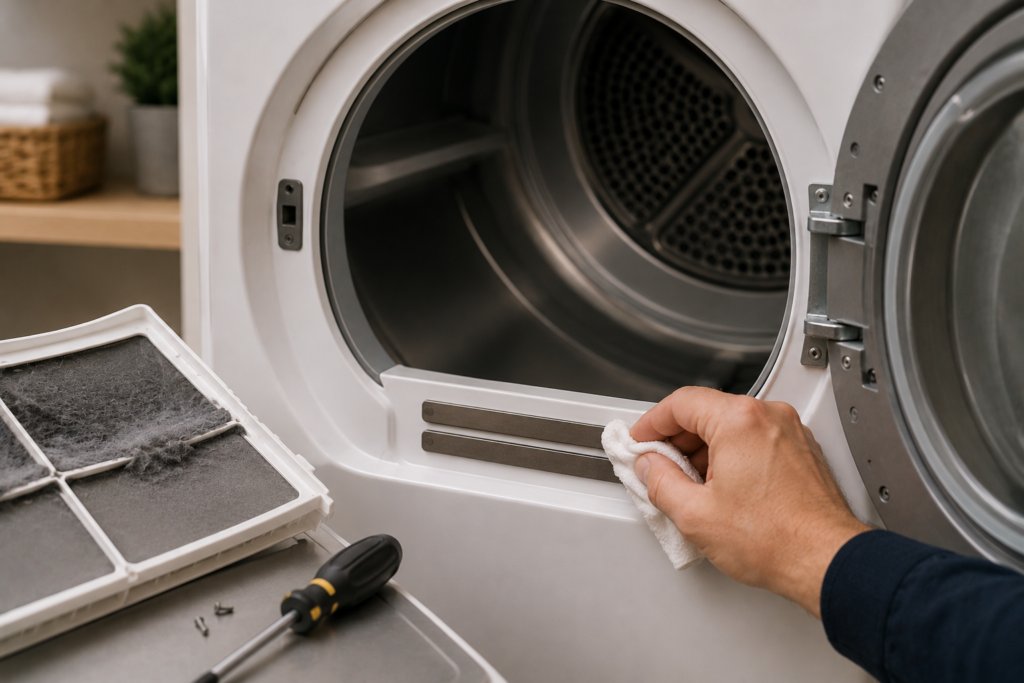
If your dryer’s auto cycle keeps shutting off too early, leaving clothes damp, or simply refuses to advance the way it should, you are dealing with one of the most common laundry appliance complaints homeowners face. A dryer auto cycle not working does not mean your appliance is finished. In most cases, the problem points to a specific component issue that you can diagnose and fix without immediately calling a technician.
The auto dry feature, often labeled as “sensor dry” on many models, is designed to detect moisture inside the drum and automatically stop the cycle once your clothes reach the selected dryness level. When this feature fails, it almost always comes down to one of several root causes: dirty moisture sensors, restricted airflow, a faulty heating element, a defective thermostat, or a malfunctioning control board. Working through each of these in order gives you the best chance of restoring normal operation quickly. This dryer auto cycle not working guide explains the most common causes, troubleshooting steps, and proven fixes to restore normal dryer operation.
Quick Key Takeaways
- Dirty moisture sensor bars are the most common cause of auto cycle failures.
- Blocked dryer vents can confuse sensors and prevent normal cycle operation.
- A faulty heating element may stop the timer from advancing correctly.
- Defective thermostats or thermistors can cause cycles to end too soon or run too long.
- Control board issues are less common but can disrupt the entire auto dry system.
- Regular cleaning and maintenance help prevent most auto cycle problems.
Table of Contents
How the Auto Dry Cycle Actually Works

Before jumping into troubleshooting, it helps to understand what the auto cycle is doing behind the scenes. Most modern dryers use one of two methods to detect when clothes are dry.
The first method uses moisture sensor strips — two thin metal bars mounted inside the drum, typically near the lint filter or along the front baffle. As wet clothes tumble and make contact with these bars, they complete a small electrical circuit. Wet fabric conducts electricity differently than dry fabric, so the dryer reads the changing resistance levels in real time. Once the moisture drops to your target dryness level, the control board signals the cycle to wind down and shut off.
The second method relies on thermostats or thermistors that monitor the temperature of the exhaust air leaving the drum. As clothes dry, less moisture is being evaporated, which causes exhaust air temperature to rise. The dryer uses this rising temperature to estimate when the load is finished.
Both systems depend on clean components, accurate electrical connections, and a properly functioning control board. When any part of this chain breaks down, the dryer auto cycle not working problem follows.
Common Reasons Your Dryer Auto Cycle Is Not Working
Dirty or Coated Moisture Sensors
This is by far the most frequent cause of dryer auto cycle problems, and fortunately, it is also the easiest to fix. Over time, fabric softener residue and dryer sheet film build up on the metal sensor strips inside the drum. This waxy coating acts as an insulator, preventing the sensors from making proper electrical contact with damp clothing.
When sensors are coated, you will notice one of two patterns:
- The dryer shuts off far too early because the sensors falsely read clothes as already dry
- The dryer runs excessively long because the coating prevents any moisture change from registering
Both situations leave you with unsatisfactory results, and both trace back to the same root cause.
How to fix it: Locate the two metal sensor bars inside the drum, usually near the lint filter housing. Wipe them firmly with a soft cloth dampened with rubbing alcohol or a mild white vinegar solution. For heavier residue buildup, buff the bars gently with fine-grit sandpaper, around 400 grit, until the metal surface looks clean and shiny again. Run a test load on the auto cycle afterward. This single cleaning step resolves the dryer auto cycle not working problem the majority of the time.
Make this part of your regular routine. Cleaning the sensor bars every two to three months prevents buildup from reaching the point where it causes real problems.
Clogged Lint Filter or Blocked Vent System
Restricted airflow is the second most common reason for a dryer auto cycle not working correctly, and it is one that homeowners frequently overlook until the symptoms become obvious.

When the lint trap is clogged or the exhaust vent is blocked, hot humid air cannot escape the drum efficiently. This creates two separate problems at once. First, the trapped humidity confuses the moisture sensors because the air inside the drum stays saturated far longer than it should. Second, the rising internal temperature triggers the high-limit thermostat to cut power to the heating element as a safety measure. On many dryer models, the timer motor only advances when the heating element is cycling on and off normally. If the thermostat has locked the heating element off, the timer motor stalls and the cycle appears completely frozen.
Beyond the auto cycle issue, a blocked vent is a genuine fire hazard. Lint accumulation in dryer vents is one of the leading causes of residential dryer fires, so this deserves attention regardless of whether the auto cycle is misbehaving.
How to fix it:
- Clean the lint screen before every single load
- Disconnect the exhaust hose from the back of the dryer and inspect it for lint buildup, kinks, or crushing
- Check the exterior vent cap outside your home to confirm it opens freely and is not blocked by debris or animal nests
- Use a vent brush kit or shop vacuum to clean the full length of the duct
For long vent runs with multiple bends, professional vent cleaning once a year is a worthwhile investment that protects both your dryer’s performance and your home’s safety.
Faulty Heating Element

Many dryer models use the heating element’s natural on-and-off cycling to indirectly drive the timer motor forward. When the heating element burns out or shorts against its housing, the timer motor stops receiving the voltage it needs to advance. The cycle timer freezes, and the dryer auto cycle not working symptom appears even though the drum may still be tumbling.
You might also notice that clothes are not getting dry at all, since no heat is being produced to evaporate moisture from the fabric.
How to fix it: Unplug the dryer before doing anything else. Access the heating element, typically located behind the rear panel or beneath a lower front panel depending on your model. Use a multimeter to test the element for continuity. No continuity confirms the element has burned through and needs replacement. Also test between the element terminals and the housing itself to check for a short to ground. A shorted element should be replaced even if it still shows continuity. Heating elements are generally affordable parts and widely available for most dryer models.
Defective Thermostat or Thermistor
For dryers that use temperature-based auto sensing, a failing thermostat or thermistor can prevent the unit from accurately gauging when clothes are dry. The cycling thermostat controls the temperature range the dryer operates within, while the thermistor feeds real-time temperature data to the control board. If either component drifts out of specification or fails outright, the dryer auto cycle not working problem typically shows up as cycles that stop randomly, run indefinitely, or never seem to register the correct temperature.
The high-limit thermostat is a separate safety device that cuts power to the heating element if temperatures reach a dangerous level. A failed high-limit thermostat can lock the heating element off permanently, which also prevents the cycle timer from advancing normally.
How to fix it: With the dryer unplugged, use a multimeter to test each thermostat for continuity at room temperature. A functioning thermostat will show continuity. One that reads open has failed and should be replaced. Thermistors require comparing resistance readings against your dryer’s service manual specifications to confirm they are within the acceptable range. These parts are typically inexpensive and accessible once you remove the appropriate panel on your model.
Control Board Failure
The control board is the brain of the entire system. It receives data from the moisture sensors and thermostats, interprets that data, and sends signals to the motor, heating element, and timer to manage the cycle from start to finish. When the board develops a faulty relay, damaged circuit trace, or electronic glitch, the dryer auto cycle not working symptom can appear even when every other individual component is functioning correctly.
Control board problems are more likely if you have already cleaned the sensors, cleared the vents, and tested the heating components without finding a clear cause. Watch for these additional signs that point toward the control board:
- Erratic or unresponsive display behavior
- Buttons that do not respond consistently
- The dryer failing to enter auto dry mode at all
- Random cycle interruptions with no obvious pattern
How to fix it: Start by unplugging the dryer for sixty seconds to perform a hard reset. This clears minor electronic glitches and sometimes restores normal operation entirely. If the problem persists, the control board likely needs professional diagnosis and replacement. Boards are model-specific, relatively expensive, and require careful installation to avoid damaging surrounding wiring and connectors.
Dryer Leveling and Small Load Problems
One lesser-known but surprisingly common cause of a dryer auto cycle not working involves how the machine sits on the floor, particularly when drying small loads. If the dryer is perfectly level or tilted slightly backward, a small load will tumble toward the rear of the drum, away from the moisture sensor bars located near the front.
With clothes rarely touching the sensors, the dryer either reads the load as dry immediately and shuts off too early, or it never gets a consistent moisture reading and runs on indefinitely. Appliance technicians encounter this regularly with small loads in large-capacity drums.
How to fix it: On most dryers where the sensors are positioned near the front of the drum, raise the rear leveling legs by about one inch. This causes laundry to naturally migrate toward the front during tumbling, keeping it in consistent contact with the sensor bars. On models where sensors are located at the rear, raise the front legs instead. Adjust, run a small test load, and observe whether the clothes stay near the sensor location throughout the cycle.
Incorrect Settings or Overloaded Drum
Sometimes the dryer auto cycle not working issue is not mechanical at all. Many dryers have multiple cycle options, and accidentally selecting a timed dry cycle instead of the sensor dry or auto cycle simply means the moisture sensing feature is never activated. The dryer runs for a fixed duration regardless of what the clothes actually need.
Overloading the drum causes a different version of the same problem. When too many clothes are packed in, air circulation inside the drum is restricted, the laundry cannot tumble freely, and contact between clothing and the sensor bars becomes too inconsistent for the dryer to get accurate readings.
How to fix it: Confirm you are selecting the correct sensor dry or auto cycle setting by checking your owner’s manual. As a general rule, fill the drum no more than three-quarters full to allow clothes to tumble freely and make reliable, consistent contact with the sensor strips
Common Mistakes That Cause Auto Cycle Problems
- Using dryer sheets excessively, which leave residue on moisture sensors.
- Ignoring lint buildup inside the exhaust vent system.
- Overloading the drum and restricting airflow.
- Selecting Timed Dry instead of Auto Dry or Sensor Dry.
- Skipping routine sensor cleaning for months or years.
- Drying very small loads without ensuring proper sensor contact.
Quick Troubleshooting Summary
If you want to work through the most likely causes efficiently, follow this order. If the dryer auto cycle not working issue continues after these checks, a faulty internal component may require further testing.
- Clean the moisture sensor bars with rubbing alcohol — this fixes the majority of auto cycle problems
- Clean the lint filter and inspect the exhaust vent for blockages or kinks
- Check the heating element for continuity using a multimeter
- Test the cycling thermostat and high-limit thermostat for continuity
- Confirm correct cycle selection and check that the drum is not overloaded
- Adjust the dryer’s leveling legs if small loads are the issue
- Perform a hard reset by unplugging the dryer for 60 seconds if the control board may be involved
Starting with the simplest and most common causes saves you time and avoids unnecessary part replacement.
Safety Note
Always disconnect power before removing dryer panels or testing internal components. If you notice a burning smell, visible wire damage, overheating, or repeated breaker trips, stop using the dryer immediately until the issue has been diagnosed and repaired. Restricted vents and electrical faults can create serious fire hazards if ignored.
You May Also Like
If your dryer auto cycle is not working, these related repair guides may help you diagnose the problem faster:
When to Call a Professional
If you have worked through every step above and the dryer auto cycle not working problem persists, an internal electrical component has most likely failed in a way that requires professional diagnosis. A licensed appliance technician can run model-specific diagnostic tests to pinpoint whether the control board, sensor wiring, thermostat circuit, or another internal component is the root cause. When replacement parts are needed, a professional ensures the correct component is installed properly and the full system is tested before the job is complete.
It is also worth calling a technician if you notice a burning smell during operation, if the dryer repeatedly trips a breaker, or if you are not comfortable accessing internal wiring and electrical components on your own.
How to Prevent Auto Cycle Problems Going Forward
Keeping the auto cycle working reliably long-term comes down to a few consistent habits:
- Clean the lint trap after every single load without exception
- Wipe down the moisture sensor bars with rubbing alcohol every two to three months
- Inspect and clean the full exhaust vent system at least once a year
- Switch from dryer sheets to wool dryer balls to eliminate the waxy sensor residue that causes most auto cycle failures
- Avoid overloading the drum so clothes tumble freely and make even contact with the sensor strips
- Make sure the dryer is properly leveled to support consistent tumbling across load sizes
These habits protect the auto cycle function, extend your dryer’s overall lifespan, reduce energy waste from over-drying, and significantly lower the risk of lint-related fire hazards. Regular maintenance is the best way to prevent a dryer auto cycle not working problem in the future.
Final Thoughts
A dryer auto cycle not working is one of those appliance problems that looks more serious than it usually is. The vast majority of cases come down to coated sensor bars or a clogged vent, both of which you can fix yourself in under thirty minutes with basic supplies you likely already have at home. Working through the causes in order, from the simplest to the most complex, resolves most situations without any professional involvement at all.
When cleaning and basic component checks do not restore normal function, a technician can quickly identify whether a failing control board, thermostat, or heating element is responsible, and get your dryer back to reliable, automatic operation without the guesswork.
About the Author & FixAppLab Resources
This guide was researched and published by Muhammad Khalid, founder of FixAppLab. The goal of FixAppLab is to help homeowners diagnose appliance problems, understand repair options, and keep washing machines, dryers, and refrigerators running efficiently.
Explore More Appliance Help
Dryer Problems
Step-by-step solutions for heating issues, moisture sensor failures, airflow restrictions, and drying performance problems.
Washing Machines
Repair guides covering drainage issues, spin problems, water inlet faults, error codes, and maintenance tips.
Refrigerators
Troubleshooting cooling problems, thermostat issues, compressor faults, and temperature control failures.
Want to learn more about FixAppLab and its appliance repair resources? Visit the About Page or explore the complete collection of troubleshooting articles on the website.


Comments